New: the AI scribe is live. Speak the consultation, review a coded draft. See Thravi’s AI

Hospital management software for nursing homes and multispeciality hospitals

A hospital is several businesses sharing a building: an OPD, wards, a laboratory, a pharmacy and an accounts desk. Thravi is hospital management software for nursing homes and multispeciality hospitals in India. It runs every department on one patient record, so the bed, the investigations, the medicines and the bill stay in step from admission to discharge.

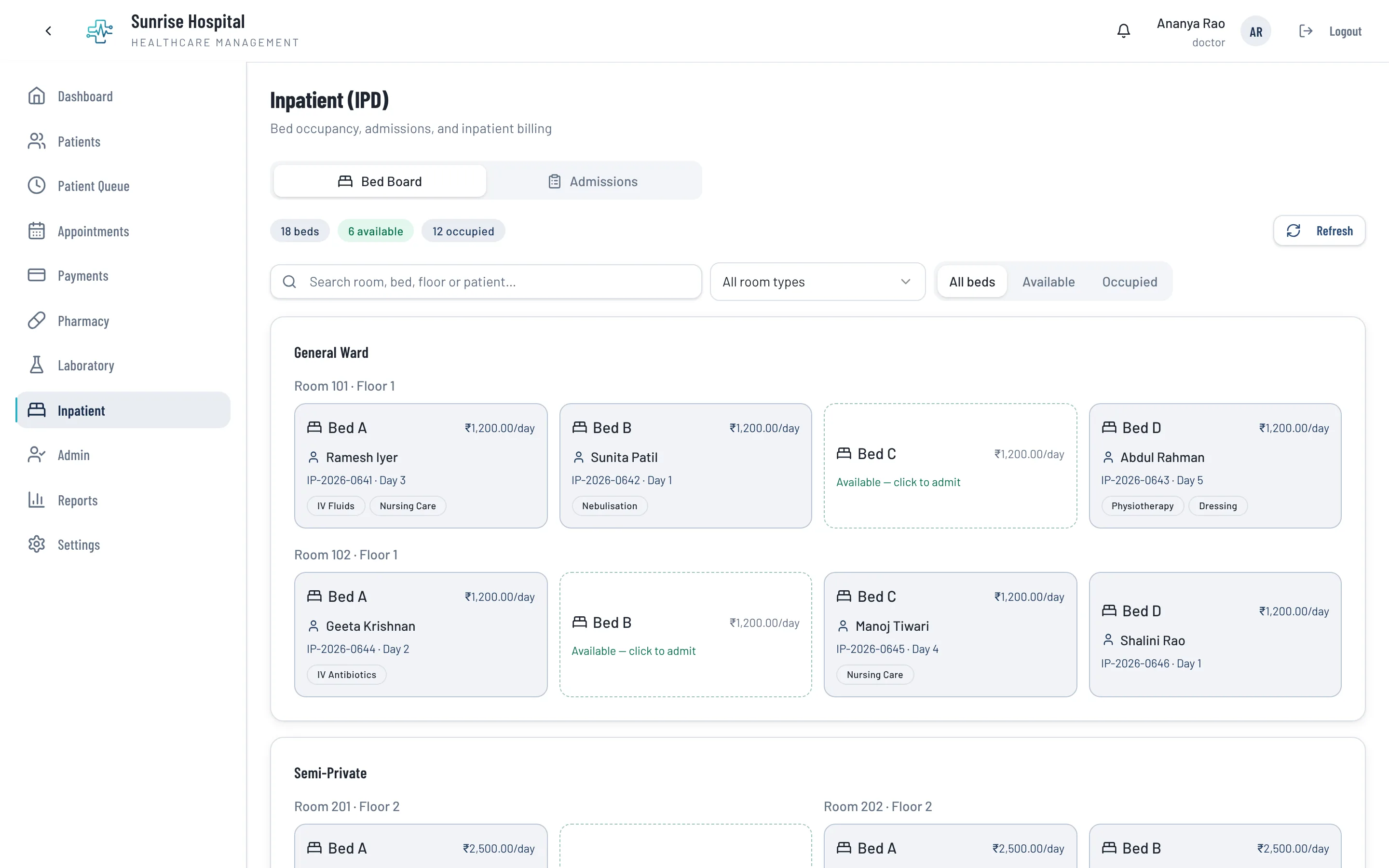
Thravi inpatient bed board showing general ward rooms with occupied and available beds, daily bed rates, and the patient and length of stay on each occupied bed

The seams where separate hospital systems leak time

Most facilities do not lack software. They lack one system. These are the joins Thravi closes for a nursing home or a multispeciality hospital.

  • Admissions, rooms and beds

    Room types, rooms and beds are set up with your own daily rates. The bed board shows what is free, who is in each bed and for how long, and a patient can be moved between beds without losing the history of the stay.

  • Ward medicines from your pharmacy

    Ward staff request medicines for an admitted patient; the pharmacy sees the request and issues against it, in part or in full. What is dispensed lands on the patient’s bill.

  • Advances and the running bill

    Advances are recorded against the admission and netted off at discharge, with refunds handled afterwards. The running bill is visible from the day of admission, not assembled at the end.

  • Packages and service pricing

    Your service catalogue holds categories, individual services and bundled packages with their own prices, so a procedure package bills as one line with its contents recorded.

  • Vitals and the inpatient summary

    Vitals are charted per round in the layout the attending doctor has chosen. The whole stay is available as a day-by-day summary, during the stay as well as after it, and exports to PDF.

  • A large team, each with their own access

    Consultants, duty doctors, nurses, front desk, lab technicians, pharmacists and accounts are each given the specific permissions they need. Key actions are written to an audit log, and data is hosted in India.

IPD software that follows the patient from bed to bill

Admission starts from the patient’s existing record, so the OPD history, lab results and previous prescriptions come with them. The attending doctor is recorded on the admission and can be notified by SMS or WhatsApp.

Through the stay, services, ward medicines and room charges collect on one bill. At discharge the advances are applied, a single discount can be given, and the bill is finalised. A finalised bill cannot be edited afterwards, only revised through a recorded step.

  • Bed board by ward, room type and daily rate
  • Transfers between beds kept as part of the stay
  • One consolidated bill for the whole admission
Thravi inpatient bed board showing general ward rooms with occupied and available beds, daily bed rates, and the patient and length of stay on each occupied bed
The IPD bed board: which beds are free, who is in the rest, and for how long. A screenshot from the product, with demo data.

A hospital pharmacy that knows its stock by batch

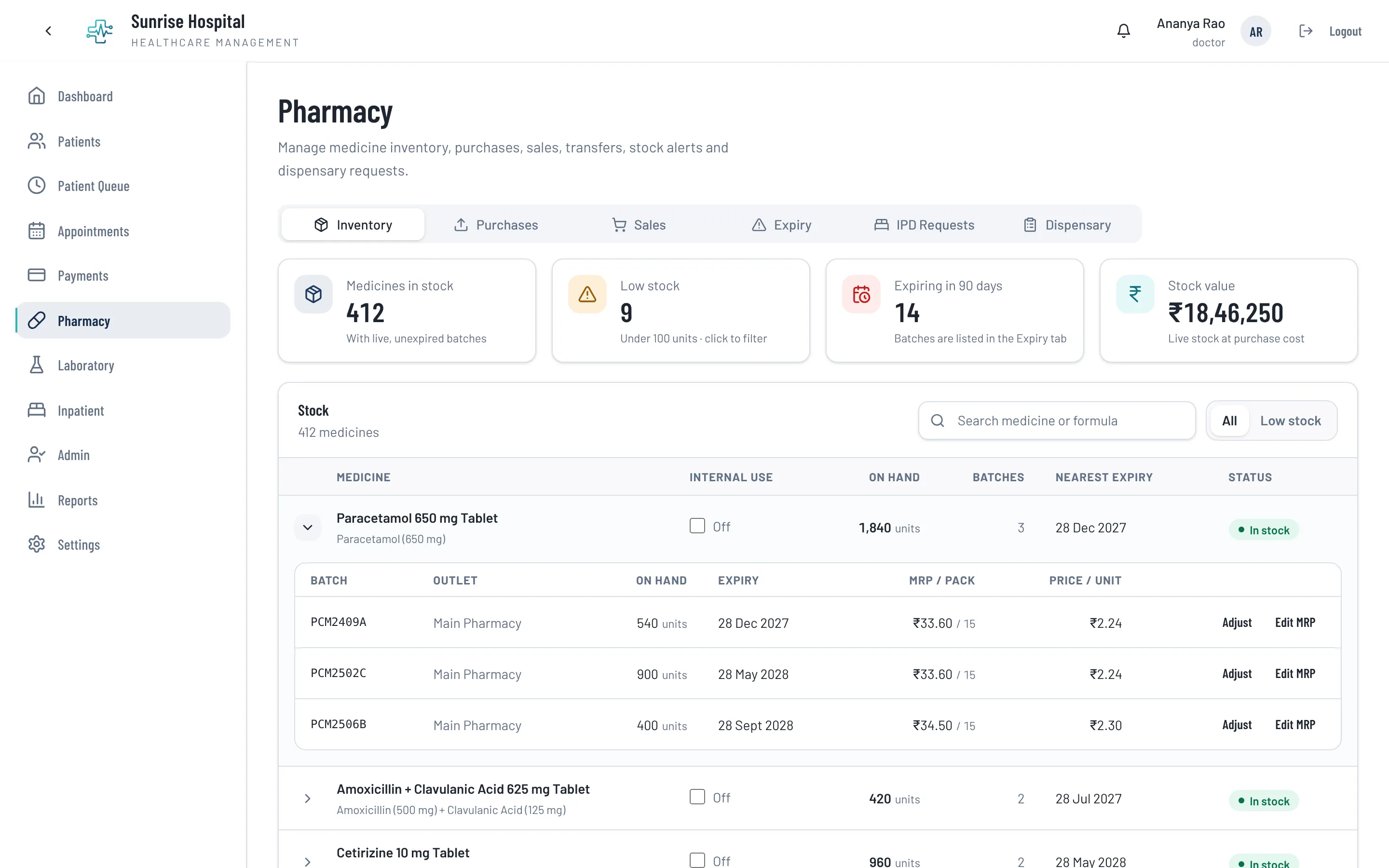
Stock is held by batch and expiry across one or several pharmacies, with low-stock and expiring lists. Prescriptions written in the OPD arrive ready to dispense, and requests from the wards have their own queue.

Purchases can be keyed in or read from the supplier’s invoice: upload the PDF or a photo and Thravi fills the purchase entry for a pharmacist to check before saving.

  • Purchases, sales, transfers and GST on pharmacy bills
  • Ward requests issued in part or in full
  • Supplier invoices read into a purchase entry for review
Thravi pharmacy inventory showing medicines in stock, low stock and expiring counts, stock value, and a paracetamol row expanded into its batches with quantity on hand, expiry date and price
Pharmacy stock by batch: quantity on hand, expiry and price for each. A screenshot from the product, with demo data.

Numbers the owner can read

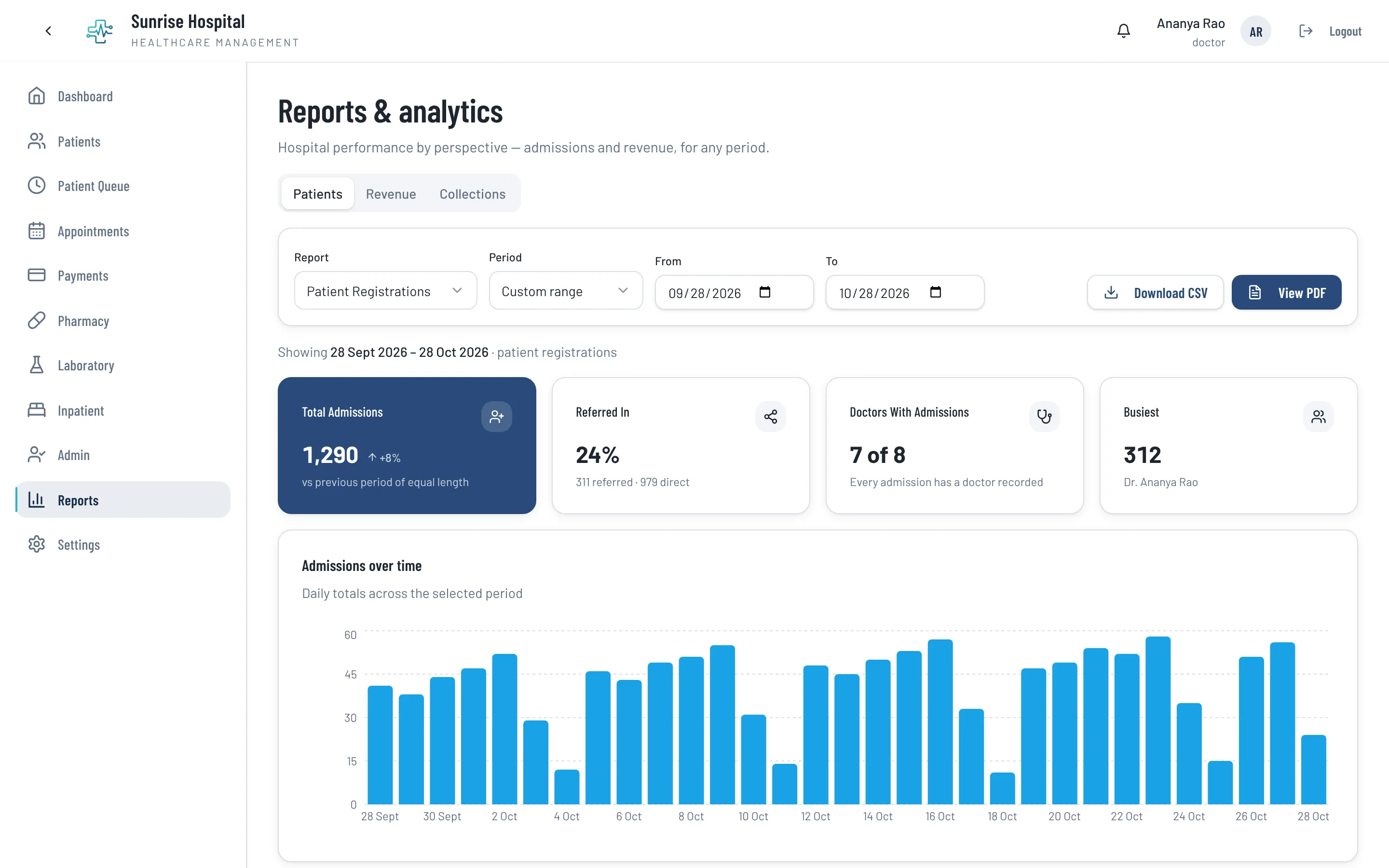
Revenue, collections, patients, admissions, pharmacy sales and doctor-wise activity are reported over any date range, and each report exports to CSV or PDF. Payments can be filtered by OP and IP.

Records are coded to SNOMED CT, ICD-10 and LOINC from the first entry, which is what ABDM exchange needs. Thravi is ABDM integration ready, implemented in line with the applicable sandbox and certification requirements.

  • Revenue and collection reports
  • Admissions and patient registrations by day
  • Pharmacy sales and margins
Thravi reports and analytics page showing patient registrations over a month as a daily bar chart, with totals, referral share and the busiest doctor
Reports over any date range, here patient registrations by day. A screenshot from the product, with demo data.

Getting started, or moving over

Opening a new facility

Set up your departments, doctors, service prices, rooms and beds once, invite staff by email or SMS, and start with registration and OPD. Turn on Laboratory, Pharmacy and Inpatient when each department is ready. A smaller practice can begin with the same system at clinic scale.

Replacing your current hospital software

Most hospitals move one department at a time, starting with registration and OPD while the pharmacy or lab stays on its existing system until you choose to move it. Tell us what your current software can export and we will say plainly what can be brought across. How switching works.

Yes. The Inpatient module covers room types, rooms and beds with daily rates, admission and bed transfers, vitals charting, ward medicine requests, advances, a running bill from the day of admission and a consolidated bill at discharge.

Yes. Both run on the same core. A nursing home typically uses OPD, Inpatient and Pharmacy; a larger hospital adds the Laboratory, more departments and more staff roles. Modules are switched on per facility.

Not today. Bills support packages, discounts, part payments, advances and refunds, but there is no insurance or TPA claim workflow yet. If cashless billing is essential for you, raise it in the demo so we can tell you where it stands.

Yes. Stock can be held across several pharmacies with transfers between them, and one login can work at more than one hospital while each hospital’s data stays separate.

Access is granted per permission to each staff member at each hospital, for example reading lab results, editing bills or managing inpatient admissions. A job title alone opens nothing, and key actions are recorded in an audit log.

Book a personalised demo

Tell us how your facility operates, and we’ll show you how Thravi can be configured for your setup.